How to exclude specific files/folders from the Plesk backup?


1. Log in to your Plesk account.


2. Go to Websites & Domains > Backup Manager.
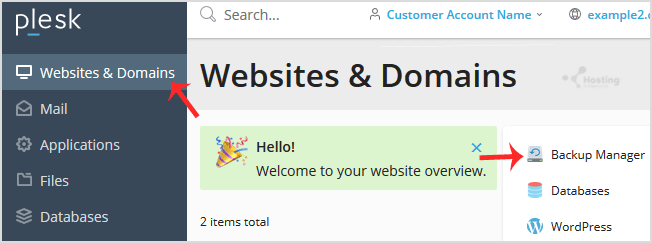
plesk-account-backup-manager-access.gif


3. Under Backup Manager, click on Back Up.
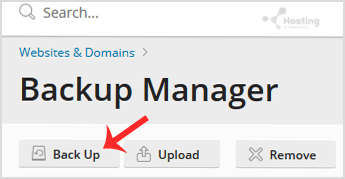
plesk-backup-manager-generate.gif


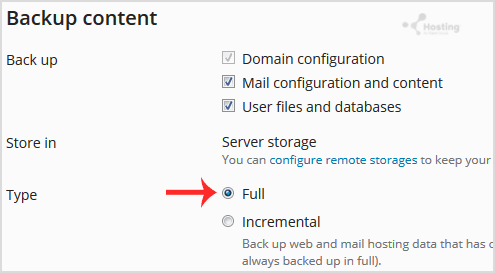
4. Choose the backup type.

plesk-backup-full-option.gif


5. Tick mark Exclude specific files from the backup.
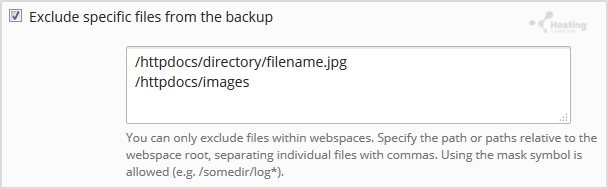
exclude-file-from-backup-plesk-account.gif


Enter the path of the file you wish to exclude, such as:

/httpdocs/directory/filename.jpg


To exclude a whole directory, enter:

/httpdocs/images


To exclude only specific extensions such as PNG, enter:

/httpdocs/images/*.png


6. Click Ok, and the backup will start generating in the background. At this point, you can navigate away from the page.

هل كانت المقالة مفيدة ؟

مقالات مشابهة

How to generate and download a full backup of your Plesk Account?

  How to Generate a Backup of your Plesk Account?   1. Log in to your Plesk account.   2....

How to Encrypt a Database Password in a Plesk Backup?

  1. Log in to your Plesk account.   2. Go to Websites & Domains > Backup Manager....

How to Configure an FTP backup in Plesk?

  1. Log in to your Plesk account.   2. Go to Websites & Domains > Backup Manager....

Powered by WHMCompleteSolution